Showing posts sorted by relevance for query code. Sort by date Show all posts

Saturday, May 6, 2017

Thinking in Algorithms: Why kids need to code in kindergarten


Kids already have too much screen time.
Isn't coding just another buzz word in education right now?
I don't have time to learn something new.
My kids play too many video games.
I don't believe in using technology in the kindergarten classroom.

This weekend I had the great pleasure of attending the 2017 ETFO Innovate Conference in rainy Niagara Falls. Each year ETFO AQ instructors meet for two days of rich collaboration, inspiration and networking. We are online instructors and as a result, embrace technology in our personal and professional practices. I will state upfront that I write this post as a biased educator and mother; teaching children for lives in an unknown future, I believe that we have an obligation to consider what 21st century competencies are and how we can immerse our children in robust and authentic educational experiences that infuse their lives with motivation and passion.


I have been speaking a lot lately about the importance of coding in the kindergarten classroom. This past year I had a vivacious group of children who ventured on a journey with me to explore how we could use coding in our math and storytelling activities. Over the last 8 months these children have become proficient using unplugged coding manipulatives (e.g., grids, props, directional cards) in order to engage in complex math games and retell/innovate favourite texts. This has sparked much interest in how we can use coding to enrich one’s existing math and literacy program by outsiders to our program.

My love of math and coding was heightened this weekend after listening to the inspirational Brian Aspinall (@mraspinall) speak about his experiences using coding and technology in the classroom. He challenged us to consider how we might use “technology as a language of learning” to motivate children.

“Coding is the new literacy helping students communicate their ideas to others.” 

He pressed upon the importance of encouraging our children to communicate using complex ways in a digital age and to “think in algorithms” in all aspects of their day.

Brian instilled a sense of urgency in me. I believe that coding is an important foundational skill that all children have a right to learn. If we introduce unplugged coding games in kindergarten then children will learn to speak and use that language fluently in their daily lives. Just as emergent spaces encourage children to personalize their learning through multifaceted sensory experiences, technology gives children one more of the ‘hundreds of languages’ through which to explore, experiment and communicate their ideas to others.

Although however essential coding might be, in my travels I have found that there is still some reluctance for infusing our early childhood spaces with technology. Confusing coding as passive, entertainment-style gaming, many worry that it will be a harmful distraction in the kindergarten classroom. That fear, coupled with an inspiring few days spent with tech-minded educators, inspired this blog post explaining what I feel are the many reasons why children in kindergarten need to learn to code.

Why code in kindergarten?


Coding is everywhere. Most appliances and everyday household items require code in order to work - your fridge, car, and even washing machine use code. When children learn coding in school they acquire a sense of how the world around them functions. In inquiry-based spaces educators hope that children will look deeply at their surroundings through a lens of curiosity. Coding helps them explore something more deeply and consider how it works, and how it might be modified to work in a different way.

Coding is easy. An educator does not need to know computer programming in order to use coding activities. Starting slowly and exploring together with the children will model curiosity and a willingness to take risks while helping teacher-learners build community and knowledge in a safe and supportive space.

Coding is cost-effective.
In a time of reduced budgets and tech-constraints, unplugged coding in kindergarten requires no computers in order to be successful. All one needs is a grid, arrow cards, and small props (e.g., blocks, animal figures). These materials can be easily made or found around the classroom and are transportable to other areas of the school (e.g., hallway, outdoors).

Coding activities naturally incorporate 21st century skills like collaboration, creativity, teamwork, critical thinking and problem solving. Children who code learn to speak a new language. They quickly realize that their directions need to be clear and precise in order to have fun and be successful in the coding play. Children learn to strategize as coding play becomes more complex and obstacles and challenges are added to their games. Algorithms that don’t work out build resiliency and persistence as children try new sequences and use mistakes as learning opportunities.

Coding integrates learning opportunities from multiple domains of development. In our world of dense curriculum and overwhelming assessment demands, it's essential that educators weave together expectations from different subjects and strands. Not only does this make the classroom a richer place to be, integrating subjects often engages children and make learning deeper and more authentic. Coding has the potential to use expectations from math, science, literacy, the arts, and physical education depending on the context.

Coding is a social activity that builds communication and relationships. Each person in the activity has a special role to play and these roles must work together in order to be successful. The directions given by the programmer must be clear and succinct and followed precisely by all players involved. Children work together to create more complex coding paths and play from one day can be continued into the next. Coding strengthens children's oral language as they describe movement while giving and receiving directions.

Coding provides opportunities for children to engage in meaningful, problem-based math that is highly engaging and of relevance to their lives. These activities integrate spatial awareness, reasoning and number sense into a highly motivating opportunity for applying math in a realistic situation that can then be transferred to a coding application (e.g., Scratch Jr., Scratch) when children are ready. The math is often complex and layered.

Coding is empowering. Learning how to program a game or animation is a very entertaining and enjoyable activity for children. Today’s kindergarten classrooms are maker spaces filled with opportunities for children to engage in the problem-solving process by manipulating loose parts in order to create. Coding is no different but in place of tangible objects that can be tinkered with, children who code are digital makers.

Coding is versatile and can be easily adapted to activities in the gym and outside learning spaces, captivating kinesthetic learners and adding another dimension to physical activities. It is an easy to adapt activity that is fun to play outside or on a very large grid. Children can code one another to move around a space or use the change in scenery to inspire a new programming narrative.

Coding can be extended with technology such as easy to use apps, websites, and robots for those who want to delve more deeply into the concepts (or for those subsequent teachers who have these children in grade 1 and beyond). Many of these are available as free apps or websites and can be suggested to families who want activities that promote home-school connections.

Coding is a global phenomenon and connects your students to their community and beyond! Educators can create their own personal learning networks by connecting with others on Twitter (#coding, #code, #program, #kindercoding). Classes can participate in the Hour of Code or learn new skills by visiting www.code.org. Children can tweet what they are doing to others. There is worldwide support and encouragement for educators who are embracing new and exciting ways of learning including using coding as a language of communication with young children!


Ready to get started? Learn how here: Creating Coding Stories and Games TYC Volume 10 (3)

Let's connect! If you code with kids, tweet me @McLennan1977 and tag it #kindercoding. Let's create an amazing network of kindercoders out there and support each other on this journey!

"When you learn to read and write, it opens up opportunities for you to learn so many other things. When you learn to read, you can then read to learn. It's the same thing with coding. If you learn to code, you can code to learn." 
Mitch Resnick


Tuesday, November 26, 2019

Encouraging Computational Thinking In Kindergarten

Young children are capable of engaging in rich computational thinking activities in the classroom. In emergent programs, the questions and wonderings children have about the world around them can easily be embedded into unplugged coding activities. Activities that incorporate computational thinking are often misinterpreted as 'more screen time' for young children, when in fact, all of the activities I use in my classroom to encourage computational thinking are screen-free without the need for computers or tablets.


Computational thinking is a foundation of computer science, and intricately related to many of the big math ideas and practices found in early childhood curriculum. It involves many concepts and approaches.

There are many different elements of computational thinking including:
  • using logic to predict and analyze when engaging in problem-solving
  • making judgments when faced with problems in order to evaluate what is happening and consider how to move forward
  • creating and following algorithms (or steps of action) in order to move through the problem solving process
  • using patterns in his/her work to find and use similarities efficiently 
  • deconstructing larger problems or actions into smaller, more manageable parts
  • filtering out information that isn't directly related to the problem or an efficient way of solving it

The computational thinker:
  •  tinkers with loose parts and other open-ended materials
  • designs innovative projects and follows through on creating them in some capacity
  • debugs by finding errors in his/her work and correcting them in order to move a project forward
  • perseveres and continues with projects even when they are challenging
  • collaborates with others as part of a team for the betterment of a project 
'Hour of Code' is December 9 to the 15 this year. Hour of Code originally started as a project to inspire people everywhere to spend one hour coding, in order to show that anyone, anywhere can code. It has become a world wide celebration of computational thinking and coding, and many global classrooms participate. 

Looking to engage children with computational thinking in your classroom? Here are some ideas to get you started. 

1. Use a read aloud to introduce the concept to children. Computational thinking can seem abstract, especially out of context. The book 'Think Like a Coder' introduces computational thinking to everyday activities that children experience including cooking, building, and even exploring the outdoors.
2. Look for everyday activities that naturally engage children in inquiry, problem solving, and computational thinking. Building with wooden blocks is a great start! Help children articulate the steps they took to build their structure, and ask them how they problem solved when difficulties arose with their creation (e.g., how they fixed a tower that kept falling over).

3. Provide STEM challenges to children. Ask them to use specific materials to achieve a certain goal, and encourage them to articulate the steps and criteria they used in order to be successful. In this photo a child turns a geoboard into a marble run maze. 


4. Introduce the idea of coding using arrow coding cards and positional language. Children can easily explore pathways by creating them using different building materials (e.g., blocks, legos, magnetic tiles) and then exploring direction of movement.


 5. Transfer coding into algorithms by helping children create and follow specific sequences of actions. Here children create and follow an 'exercise code' where they must look at each line of code in the script, and follow the movements precisely.


Computational thinking is a versatile, foundational approach to learning that helps engage children in rich mathematical activities. As Hour of Code approaches be sure to check out my twitter and instagram @McLennan1977 for more ideas on how to bring computational thinking and coding to your early years and primary classroom. 

Let's connect! Have a great idea to share? Leave it below in the comment section or tweet me and use the hashtags #kindercoding #joyfulmath #HourofCode and #MTBoS!

Wednesday, June 8, 2016

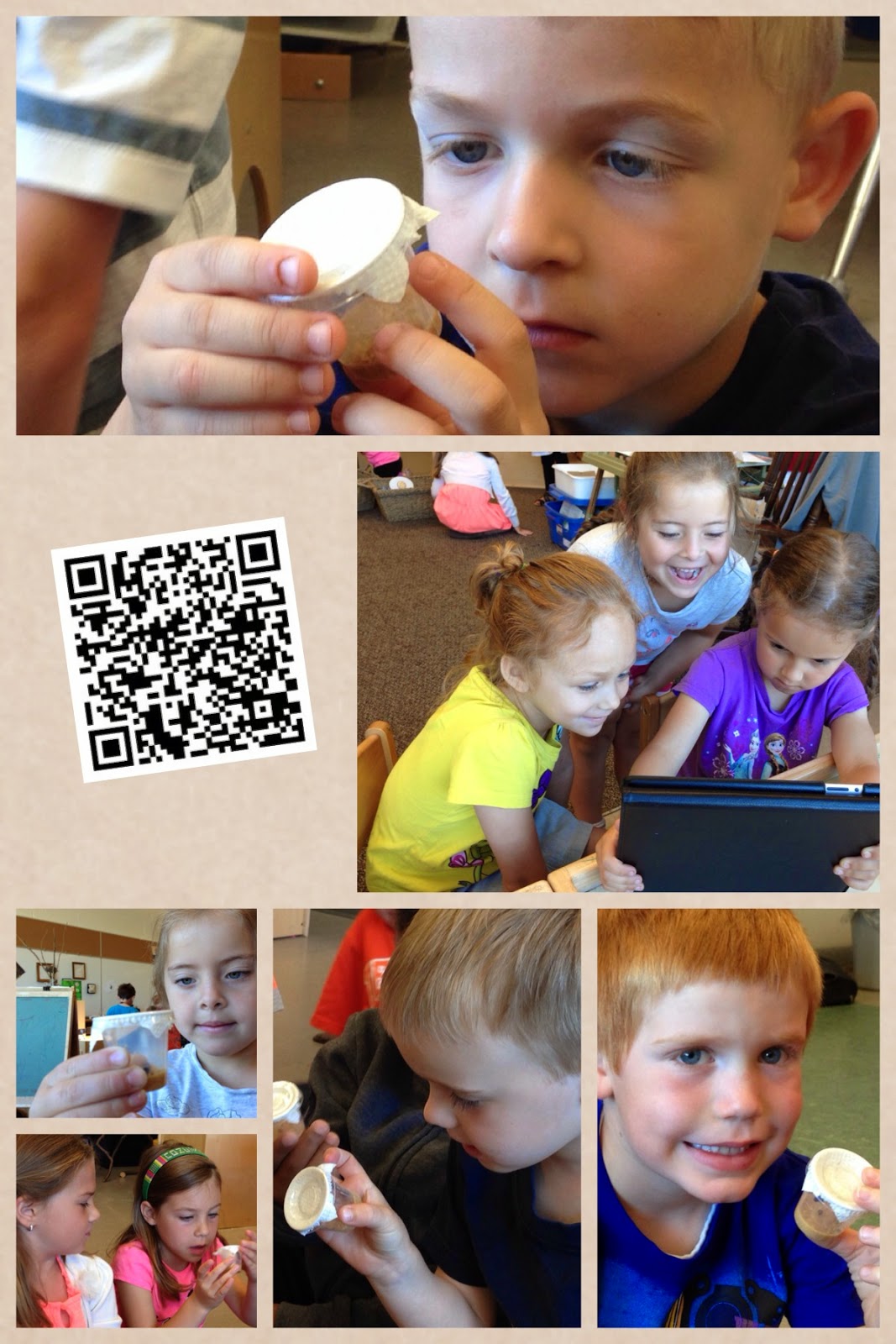
Using QR Codes to Explore Painted Ladies

Our children have been busy observing and exploring our Painted Lady Caterpillars in the classroom. Having the opportunity to nurture a caterpillar to butterfly has given children authentic motivation to learn about Painted Ladies as they build empathy and understanding while caring for a living thing.

We are always searching for ways to integrate technology in a meaningful way that helps build our collective knowledge and experience throughout the process of learning. We want technology to compliment and support our emerging understandings and help children see its potential in their work with one another. Because our children love to go on 'hunts' around the room, we set up an activity today that had five cards with corresponding QR codes hidden around the room.

Each code looked like this and had...


...a number to indicate its order, a sentence to describe the life cycle stage being explored, and a QR code leading the child to a video showcasing that stage.  

After a quick refresher on how to use the QR code scanners, children worked in pairs to search the room for the codes, used the app to scan them, and enjoyed the detailed videos highlighting a specific stage of the butterfly's life cycle. What we love about this activity is that children get practice using the QR scanner app, learn how the codes can help access information quickly and easily, and the retrieved videos nicely compliment the text-bound information that we have been relying upon. The videos engage children in a different way than books do and re-energize the children's interest in the caterpillar centre.


We just loved the look of interest and wonder on the children's faces as they carefully watched the videos together. There were many connections as children realized that many of the videos were time lapsed; we have a lot of experience creating our own as part of our documentation explorations.


We are sharing our QR codes for those educators who might be interested in using something similar in the classroom. Just click on the link, print the codes, and use an QR code reader to access the videos. Enjoy!

Thursday, October 27, 2016

Halloween Inspired Coding

The children have been very interested in maps lately; they create them at our writing table and use them in their dramatic play, refer to printed maps during outside time as they run and ride around on the tricycles, and talk about hiding treasure in our classroom and creating maps to help others find it. They are curious about places in our school and the hallways we need to take to get there.

As I reflected upon their genuine interest in location and maps, I thought it was the perfect time to introduce them to coding. Why coding?

1. Coding is basic language in the digital age. Computer programming is a language and is going to be an essential skill for many of our children to know as they grow. Our world is digital - providing children with activities that integrate communication, thinking and problem solving will be valuable for their future success. So many people are technology shy, and helping our children to be technologically literate is vital. The earlier one learns and practices the basics of this type of language, the easier it will be and the more positively it will affect their developing brains. 

2.  Coding is math. It involves spatial reasoning and logic. Helping children to think about direction, location and movement will strengthen their math skills. Children need to count the number of spaces being moved and indicate in which direction they are headed. Coding integrates a number of math skills together in one experience.

3.  Coding encourages problem solving. When activities like coding provide a challenge for the user, or there are multiple ways of solving the same problem, an emphasis can be placed on the process of learning and the child can consider multiple paths of arriving at a solution and choose the best or most efficient strategy. Planning ahead and being critical about the path of the activity is key for success.

4. Coding strengthens communication. When a child codes, she or he needs to indicate directions to another person (or the computer). These directions need to be as succinct as possible. When two children are playing coding games the child receiving the directions needs to be an active listener in order to move the coding pieces in the correct way. Clear communication is essential for success.

Want to learn how to better support your child's coding at home? Read this great article from CBC called Why Kids Should Learn to Code (And How to Get Them Started)

For today's coding activity I decided to use a spooky Halloween scenario to get the children to buy into the experience right from the start.

I created a simple grid using masking tape and our clear sensory bin lid. I wanted to engage the children in an experience that would help them understand the basics of coding. For this game we had four basic commands - "go right", "go left", "go up" and "go down". 


We had two pictures - one of a house (where the character would start) and one of candy (which is where the character needed to end). The children pretended that this was a trick-o-treater heading out on a scary Halloween night where many obstacles like bats, spiders, and other spooky creatures might be blocking the path. The ultimate goal was to move a character from the house to the candy as efficiently as possible without running into a spooky obstacle. 


The children used sticky notes with arrows drawn on them to indicate the codes. I encouraged them to verbalize their thinking and count the number of steps in their code. (e.g., "Move left 3 times, move up three times, move left one time, move up two times, move right one time").


This activity generated a great amount of interest, with many spectators watching the action or offering suggestions for more efficient ways to get to the candy faster.


As the children became more comfortable they created more complex paths to the candy by strategically placing the obstacles in the way. They were also very attuned to the grid and noticed when too many obstacles were placed on it and wouldn't allow a clear path.


In order to offer children a different perspective, I also had paper grids prepared with the same experience (house, candy, spooky obstacles) and invited the children to plan out the code directly on the paper.


Blank hundreds charts were also available for those children who wanted to draw their own Halloween obstacles and then program the code.


Stay tuned as we will continue with our spooky Halloween coding tomorrow and use more ideas that can be easily implemented into many scenarios to encourage children to use the basics of programming. For those who would like to print the coding pages used in this experience, please click on the following links.

Simple Halloween Coding Grid

Difficult Halloween Coding Grid

Printable Halloween Coding Pieces

Blank Hundreds Grid

Monday, May 15, 2017

Communicating in Algorithms: Connecting coding to literacy


"We should think about what we mean by literacy. If you say, "He's a very literate person," what you really mean is that he knows a lot, thinks a lot, has a certain frame of mind that comes through reading and knowing about various subjects. The major route open to literacy has been through reading and writing text. But we're seeing new media offer richer ways to explore knowledge and communicate, through sound and pictures."

Seymour Papert, 1997

Mother's Day was filled with sunshine, laughter and the usual mess of having the kids home for two days in a row; roaming indoors and out and savouring the freedom that unstructured time provides. However what was interesting for me was that this weekend Caleb expressed an interest in learning how to use the Rainbow Loom. Not one to spend much time on crafty business, he had passed up opportunities using the extra loom I had picked up for him a few weeks ago. But early Saturday morning I noticed him watching Cadence work from afar. He eventually made his way to her side and spent several minutes observing her. Was it hard? Could he borrow her stuff? Did she have extra elastics for him too? Would she help him if he got stuck? He peppered her with questions. She timed her answers to the crescendo of video clips as she worked on her Ninja Turtle design. And then something caught his eye in the corner of her screen. He was sold. There, in bright red and yellow, was the most comical looking elastic-y hotdog. And with that he was off to gather his loom and iPad, and set to work on the kitchen table.


After an hour or so I heard him set his hook down with a clatter. I approached him to see how it was going.

"Terrible!" he responded. "The girl is this video doesn't give good directions. I have no clue what to do. She's not making any sense."

Caleb's frustration trying to following someone's inadequate directions reminded me of how powerful and precise oral language has to be in many of life's situations. Not only do we need clear and direct explanations, we also must be ready and able to carry out the directions in the manner they were given in order to experience success. He was unable to make a Rainbow Loon hotdog because the directions did not make sense to him. I immediately thought of coding. In the past I have spent much time linking coding to math due to the rich, integrated opportunities for number sense and geometry it provides. But what about literacy? Many educators are continuously looking at ways to embed and improve meaningful language-based activities in their emergent programs. Can coding help with this? How does coding encourage users to become more proficient communicators? Can coding strengthen kindergarten literacy programs in the same ways it does math?

I believe that kindergarten children who utilize complex, integrated coding activities in their daily lives will have opportunities to strengthen their literacy skills. Here are some of the ways:


Coding requires accurate language in order to be successful. Computers follow the code outlined in their programs. There is no room for interpretation, and as a result, a programmer must be incredibly clear and detailed in their algorithms. When children use coding as a language of communication in the classroom they practise this succinct way of articulating directions to others on a regular basis. Over time they will improve in their abilities to be precise when crafting these programs and directing others in activities.

Coding reinforces concepts of print.  In our classroom children are encouraged to write their code in different ways. They can order our class set of coding cards on the floor or in a pocket chart, or they can write their directions using a series of predetermined symbols (e.g., arrow, stop sign). When writing or reading these directions they are encouraged to move from top to bottom, left to right replicating the way we read and write in the English language. I always ask them to use their 'reading finger' and point to each card as they work. This reinforces the same concepts of print we are working on in our whole and small group literacy activities.


Coding uses symbolic language that children will be able to read and write even if they are not yet fluent using letter and sound relationships. Because kindergarten coding uses pictures, many children can easily create messages for one another by sequencing coding cards, or drawing established symbols digitally or on paper. A class can determine their own set of symbols before coding work begins so that everyone understands what they represent. Over time and with experience children will become proficient communicators using these. Just as early mark-making is a foundational part of establishing positive literacy behaviors, coding helps children easily communicate their ideas to others showing that oral language can be translated and preserved in multiple ways.

Coding builds confidence and fluency in early readers and writers. With practice children will improve in their abilities to communicate using symbolic language. In our classroom coding activities are always very popular and as a result even the most reluctant children in more traditional literacy activities want to participate. This grows their mindset and confidence because the more they practice, the better they become.

Coding encourages active listening. Regardless of how well constructed an algorithm is, it can only be successfully implemented if a child is listening intently and following through successfully on the given directions. Coding work requires concentration and full engagement. This helps children practise being attentive and responsive listeners.

Coding is a universal language that helps people speak to one another all over the world. In our classroom children blog and tweet extensively about their daily experiences. A very important part of the inquiry process is sharing one's understanding beyond the metaphorical 'walls of the classroom'. Because coding is used all around the world (and such a hot topic in education right now) children can participate in a global event, communicating with children in different countries, even where English is not the common language. One of my daughter's favourite things to do online is look inside the many creations posted on the Scratch website so she can see the code that was used.

Coding sequences a story from beginning to end which requires users to group events together and retell them in the proper order. In our classroom children often use favourite texts as the foundation of their coding games (e.g., retelling the events in the Gingerbread Man; helping the Gingerbread Man escape the fox at the end of the story). This means that children need to be able to accurately sequence a story in the correct order so that it makes sense. They need to consider the beginning, middle and end events and retell these in their coding directions so that the game makes sense. This strengthens their comprehension of literature and encourages them to demonstrate their knowledge in hands-on ways as they play with stories. 

Coding often tells a story that requires users to imagine setting, characters, and plot. This reinforces comprehension of texts, especially when favourite read alouds are used as the inspiration behind activities. When creating their own stories using the coding board, children need to establish their own engaging characters and plots in order for the activities to be fun to play.


Coding is found in our daily routines as we compose instructions to one another in our classrooms and beyond. Thinking and communicating in algorithms extends beyond coding activities. There are multiple opportunities each day for adults and children to give and receive directions to others. When we think as coders, we realize that we are more effective and efficient when our communication is clear and easy to follow. Children can be reminded of this in their work outside of programming. Educator Brian Aspinall (@mraspinall) emphasized at a recent PD event that I attended that he asks his students to "speak to each other in algorithms" in daily activities, even those unrelated to coding, in order to emphasize clear and direction language.

Coding can become an expressive language, much like the arts, helping children to articulate their ideas and show their comprehension to others. Emergent programs influenced by Reggio Emilia encourage children to explore and share their learning using 'hundreds of languages' including the arts, physical expression, and building. Coding can become another language children use to communicate in inquiry-based classrooms, especially once they are proficient using it on a regular basis. For example, why not encourage a child to demonstrate their understanding by creating a code to show and share their new knowledge with others (e.g., coding the lifecycle of a butterfly).

How else does coding encourage literacy in the classroom? Share your ideas in the comment section below or tweet me @McLennan1977 and tag it #codingandliteracy. 
 

Saturday, May 24, 2014

QR Codes and Documentation

We have been experimenting with QR codes in our classroom, especially to help children access familiar songs and stories online. We also like to use the app Pic Collage to compile photos and other information about children as one of our documentation strategies. This week we tried combining the two - we have included a QR code on the Pic Collage so that when families receive a copy of this documentation they can scan the code and access additional information about the experience (e.g., a link to a blog entry, a YouTube video of children in action, a sound clip of a child discussing their work or experiences housed online). We are hoping that this helps families access additional information regarding their children and our program, and encourages our students to use technology like QR codes in innovative ways at home.

In addition to sending home a copy of our Pic Collage documentation, we like to keep a copy in subject specific binders around the classroom for the children to peruse during playtime. Now that QR codes are embedded in the collages, our children will also be able to access the additional information when using our class iPads! Here's a sample of the documentation:


Thursday, June 12, 2014

QR Code App Tutorial

There has been much interest lately in how to use QR codes with young children. These are a very versatile tool in the classroom to help children find materials online and can also be used at home for parents who would like to create a digital 'library' for their children. They make artifacts in the classroom (e.g., photos, artwork, writing samples) come alive when they are included as part of the documentation. They are also an easy way to create a digital listening centre for children when access to smart devices is provided. In the following video I've demonstrated how to use a free app called QR Code Creator. Enjoy!


Wednesday, February 23, 2011

More Secret Spies

Our children were incredibly engaged with one another while at the dramatic arts "Spy Headquarters" again today. Their level of imagination and storytelling was just fantastic and inspiring to observe. The children engaged in rich communication with one another and they cooperatively worked through their imaginative play, using specialized spy vocabulary to add to the experience.

In order to engage children in writing, we put out our secret message activity where children used white crayons and water colour paint to decode messages they wrote to one another.


We rearranged our furniture so that the headquarters has a regular door and a secret entrance for the children to enter and exit through.


A secret code keypad has been added to help motivate the children with exploring numbers - sharing the secret code with one another and finding and pressing the corresponding numerals in order to gain entry to the headquarters.


Miss Rahman helped the children to make a secret spy phone so that outsiders could call into the spy headquarters for help.


\

In the afternoon we thought it would be fun to engage the children in a little classroom mystery by placing footprints from the window and back door and leading them to an empty book shelf. The books were missing!


The children bought into the adventure and spent the afternoon playtime searching for clues as to where the missing books went.


Did your child come home with a blue finger? We invited interested children to place a fingerprint on a large piece of paper. We're hoping to explore the science of fingerprints in the next few days by examining the unique differences in our own.

Related Posts Plugin for WordPress, Blogger...